Cable Gland - Waterproof RJ-45 / Ethernet connector (RJ-45)
We have some great waterproof and weather-proof items in the shop, but once you have a project built, you'll want to enclose it. But how to keep an enclosure weather/waterproof while still attaching cables for power, data or sensors? That's where cable glands come in. By installing these over the cable, they form-fit to make a seal, keeping your project box innards safe from the outdoors.
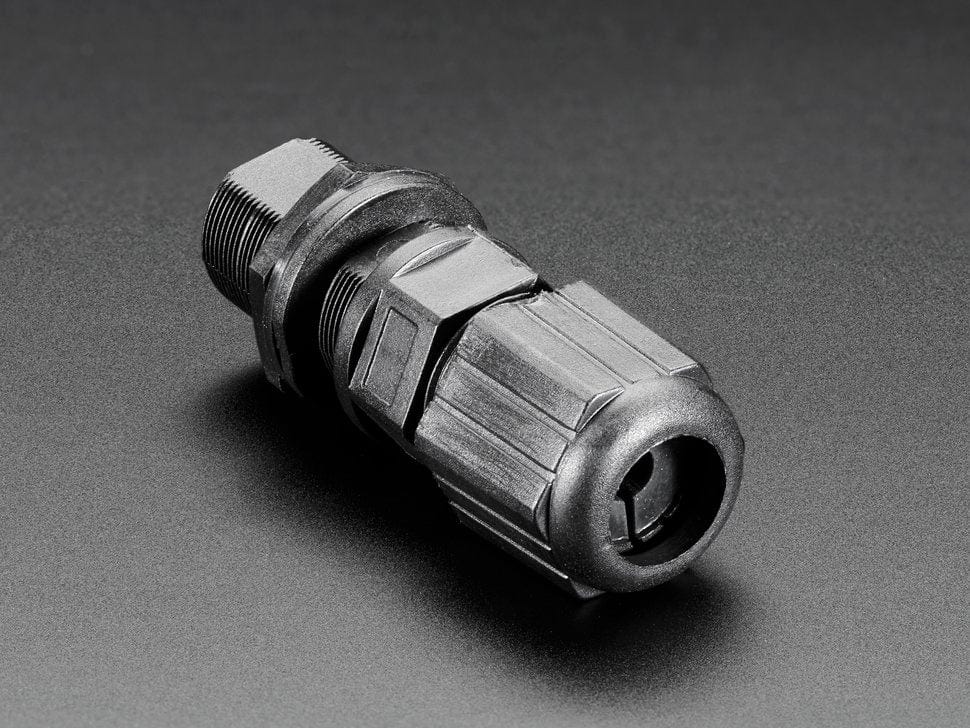
This particular gland is specifically designed for RJ-45 cables, commonly known as Ethernet or Cat-5 cables. This gland is meant to work with any existing Ethernet cable and works in two parts to allow attachment/detachment. First, install the dual-socket part into the enclosure (that's the part all the way to the left). It has two RJ-45 sockets. Next, take apart the gland and slide the Ethernet cable thru it, with the over-nut first, then the rubber gasket, then finally the contracting gland. Plug in the cable, and screw the first over-nut to attach it to the socket, then tighten the gland to complete the seal.
Please note, if you have a Ethernet cable with a over-molded boot, the boot can get in the way of the cable. you can cut the boot off (carefully!) or use non-boot-having cables.
Adafruit Best-Friend-Forever (BFF) Akiba over at Freaklabs.org has a great tutorial about how to use cable glands to keep waterproof enclosures waterproof, even with power or data or sensor cables coming out. Please check it out for some excellent information about how to use them!
An Ethernet/RJ-45 Cables is not included!
Technical details
We have some great waterproof and weather-proof items in the shop, but once you have a project built, you'll want to enclose it. But how to keep an enclosure weather/waterproof while still attaching cables for power, data or sensors? That's where cable glands come in. By installing these over the cable, they form-fit to make a seal, keeping your project box innards safe from the outdoors.
This particular gland is specifically designed for RJ-45 cables, commonly known as Ethernet or Cat-5 cables. This gland is meant to work with any existing Ethernet cable and works in two parts to allow attachment/detachment. First, install the dual-socket part into the enclosure (that's the part all the way to the left). It has two RJ-45 sockets. Next, take apart the gland and slide the Ethernet cable thru it, with the over-nut first, then the rubber gasket, then finally the contracting gland. Plug in the cable, and screw the first over-nut to attach it to the socket, then tighten the gland to complete the seal.
Please note, if you have a Ethernet cable with a over-molded boot, the boot can get in the way of the cable. you can cut the boot off (carefully!) or use non-boot-having cables.
Adafruit Best-Friend-Forever (BFF) Akiba over at Freaklabs.org has a great tutorial about how to use cable glands to keep waterproof enclosures waterproof, even with power or data or sensor cables coming out. Please check it out for some excellent information about how to use them!
An Ethernet/RJ-45 Cables is not included!
Technical details
Original: $6.90
-65%$6.90
$2.42Description
We have some great waterproof and weather-proof items in the shop, but once you have a project built, you'll want to enclose it. But how to keep an enclosure weather/waterproof while still attaching cables for power, data or sensors? That's where cable glands come in. By installing these over the cable, they form-fit to make a seal, keeping your project box innards safe from the outdoors.
This particular gland is specifically designed for RJ-45 cables, commonly known as Ethernet or Cat-5 cables. This gland is meant to work with any existing Ethernet cable and works in two parts to allow attachment/detachment. First, install the dual-socket part into the enclosure (that's the part all the way to the left). It has two RJ-45 sockets. Next, take apart the gland and slide the Ethernet cable thru it, with the over-nut first, then the rubber gasket, then finally the contracting gland. Plug in the cable, and screw the first over-nut to attach it to the socket, then tighten the gland to complete the seal.
Please note, if you have a Ethernet cable with a over-molded boot, the boot can get in the way of the cable. you can cut the boot off (carefully!) or use non-boot-having cables.
Adafruit Best-Friend-Forever (BFF) Akiba over at Freaklabs.org has a great tutorial about how to use cable glands to keep waterproof enclosures waterproof, even with power or data or sensor cables coming out. Please check it out for some excellent information about how to use them!
An Ethernet/RJ-45 Cables is not included!