HDMI 4 Pi: 7" Display & Audio 1024x600 - HDMI/VGA/NTSC/PAL [Discontinued]
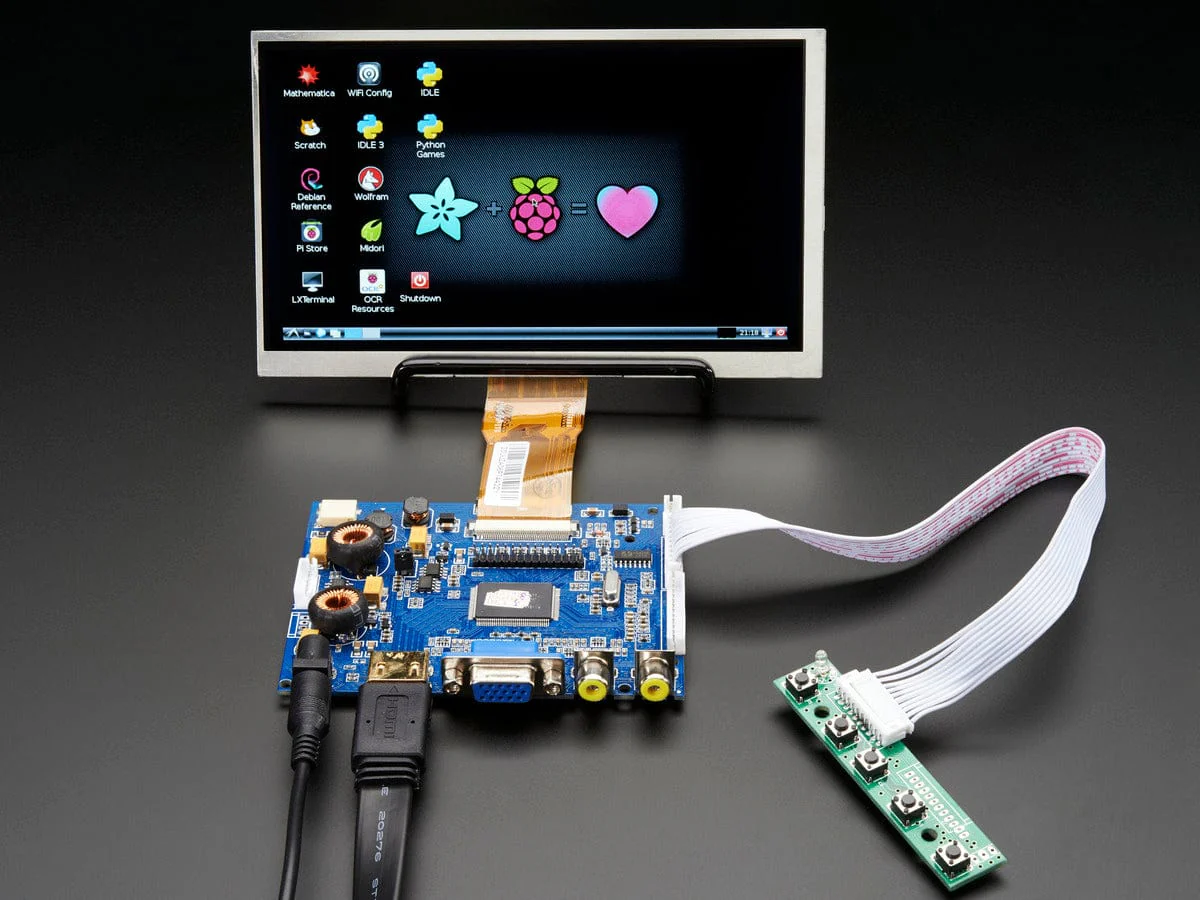
Yes, this is a 7" TFT display with 1024x600 resolution with audio-over-HDMI capability! We tried to get the best medium-size display that would be good for embedded computing usage and at a good price. We include a driver board with HDMI, VGA and Composite inputs as stereo 4 ohm at 3W output speaker driving capability. The visible display measures 7" diagonal and is a 'raw TTL' display. The set up is very easy to use - simply connect a 9-12VDC adapter to the 2.1mm center-positive DC jack, then connect a digital video source to one of the ports and two 4 to 8 ohm speakers to the SPK output pins. Voilà, a display with audio!
It is not an IPS display so its best for direct viewing, our 7" and 10" HDMI IPS displays are designed for any angle view. That said, its the nicest 7" 1024x600 display we could get.
There's a little wired PCB with little buttons that let you enter a menu system for adjusting brightness, color and contrast. It tries to auto-detect which input you have and switches to that one or you can 'select' from the menu which to display.
We include a plug-in cable that connects to the 4 speaker output pins, the pins are labeled LOUT+/- and ROUT+/-. You'll have to solder your own speakers to the 4 wires
To demonstrate it, we took some photos with the display connected to a Raspberry Pi, but it will also work connected to any device with HDMI, VGA or NTSC/PAL output. It will not work with a device that only outputs DVI (without a DVI to HDMI converter) or SECAM.
For use with a Raspberry Pi we suggest editing config.txt to set the HDMI to native 1024x600 in case it doesn't detect the resolution properly. You can see our suggested config.txt in the Technical details tab. The easiest way to edit the config.txt is to put the Pi SD card into an every day computer and edit config.txt with any text editor and save. For use with a BeagleBone Black running Ubuntu/Debian, we found it works when plugged in, no configuration required.
A power adapter is NOT included. You will need to either purchase a 5-12VDC adapter or you can use one you've already got around the house. We show the display on a bent wire stand which is not included, but you can pick one up here
Technical Details
- Driver Datasheet
- Keyboard Datasheet
- TFT Display Datasheet
- Power with 9-12VDC
- Resolution: 1024 x 600
- Display Weight (excluding power cable): 97g
- Not HDCP compatible - it cannot be used with 'secured' HDMI sources
Yes, this is a 7" TFT display with 1024x600 resolution with audio-over-HDMI capability! We tried to get the best medium-size display that would be good for embedded computing usage and at a good price. We include a driver board with HDMI, VGA and Composite inputs as stereo 4 ohm at 3W output speaker driving capability. The visible display measures 7" diagonal and is a 'raw TTL' display. The set up is very easy to use - simply connect a 9-12VDC adapter to the 2.1mm center-positive DC jack, then connect a digital video source to one of the ports and two 4 to 8 ohm speakers to the SPK output pins. Voilà, a display with audio!
It is not an IPS display so its best for direct viewing, our 7" and 10" HDMI IPS displays are designed for any angle view. That said, its the nicest 7" 1024x600 display we could get.
There's a little wired PCB with little buttons that let you enter a menu system for adjusting brightness, color and contrast. It tries to auto-detect which input you have and switches to that one or you can 'select' from the menu which to display.
We include a plug-in cable that connects to the 4 speaker output pins, the pins are labeled LOUT+/- and ROUT+/-. You'll have to solder your own speakers to the 4 wires
To demonstrate it, we took some photos with the display connected to a Raspberry Pi, but it will also work connected to any device with HDMI, VGA or NTSC/PAL output. It will not work with a device that only outputs DVI (without a DVI to HDMI converter) or SECAM.
For use with a Raspberry Pi we suggest editing config.txt to set the HDMI to native 1024x600 in case it doesn't detect the resolution properly. You can see our suggested config.txt in the Technical details tab. The easiest way to edit the config.txt is to put the Pi SD card into an every day computer and edit config.txt with any text editor and save. For use with a BeagleBone Black running Ubuntu/Debian, we found it works when plugged in, no configuration required.
A power adapter is NOT included. You will need to either purchase a 5-12VDC adapter or you can use one you've already got around the house. We show the display on a bent wire stand which is not included, but you can pick one up here
Technical Details
- Driver Datasheet
- Keyboard Datasheet
- TFT Display Datasheet
- Power with 9-12VDC
- Resolution: 1024 x 600
- Display Weight (excluding power cable): 97g
- Not HDCP compatible - it cannot be used with 'secured' HDMI sources
Description
Yes, this is a 7" TFT display with 1024x600 resolution with audio-over-HDMI capability! We tried to get the best medium-size display that would be good for embedded computing usage and at a good price. We include a driver board with HDMI, VGA and Composite inputs as stereo 4 ohm at 3W output speaker driving capability. The visible display measures 7" diagonal and is a 'raw TTL' display. The set up is very easy to use - simply connect a 9-12VDC adapter to the 2.1mm center-positive DC jack, then connect a digital video source to one of the ports and two 4 to 8 ohm speakers to the SPK output pins. Voilà, a display with audio!
It is not an IPS display so its best for direct viewing, our 7" and 10" HDMI IPS displays are designed for any angle view. That said, its the nicest 7" 1024x600 display we could get.
There's a little wired PCB with little buttons that let you enter a menu system for adjusting brightness, color and contrast. It tries to auto-detect which input you have and switches to that one or you can 'select' from the menu which to display.
We include a plug-in cable that connects to the 4 speaker output pins, the pins are labeled LOUT+/- and ROUT+/-. You'll have to solder your own speakers to the 4 wires
To demonstrate it, we took some photos with the display connected to a Raspberry Pi, but it will also work connected to any device with HDMI, VGA or NTSC/PAL output. It will not work with a device that only outputs DVI (without a DVI to HDMI converter) or SECAM.
For use with a Raspberry Pi we suggest editing config.txt to set the HDMI to native 1024x600 in case it doesn't detect the resolution properly. You can see our suggested config.txt in the Technical details tab. The easiest way to edit the config.txt is to put the Pi SD card into an every day computer and edit config.txt with any text editor and save. For use with a BeagleBone Black running Ubuntu/Debian, we found it works when plugged in, no configuration required.
A power adapter is NOT included. You will need to either purchase a 5-12VDC adapter or you can use one you've already got around the house. We show the display on a bent wire stand which is not included, but you can pick one up here
Technical Details
- Driver Datasheet
- Keyboard Datasheet
- TFT Display Datasheet
- Power with 9-12VDC
- Resolution: 1024 x 600
- Display Weight (excluding power cable): 97g
- Not HDCP compatible - it cannot be used with 'secured' HDMI sources